
Retail Schedule Software for Shops and Stores
Retail schedule planning
Shops need the right number of people on the floor at busy times, and the schedule changes every week around part-time staff, time off requests and last-minute changes. With a large team or several stores, a spreadsheet soon gets hard to manage.
Get it wrong and you are short-staffed on a Saturday, or paying for too many people on a quiet Tuesday.


How ShiftApp helps
ShiftApp has simplified our staff scheduling. The things that we find valuable are the phone app, being able to see staff availability and most importantly the daily reminders - so none of our staff have any excuse for not knowing when their next shift is.

Vicky Brown
Owner & Managing Director
Just Williams Toyshops
What retail teams get with ShiftApp:
- Less time on the schedule: plan a week once and set it to repeat for the months ahead.
- Quick changes: move, add or cover shifts in a few clicks.
- Staff told straight away: notifications and reminders mean fewer missed shifts.
- The schedule on every phone: staff check their shifts in the free app.
- Time Off in one place: staff request time off from their phone, and you approve it on the schedule.
- Easy to learn: no training course needed for managers or staff.
- Priced by the number of employees: pick the plan that fits your staff numbers.
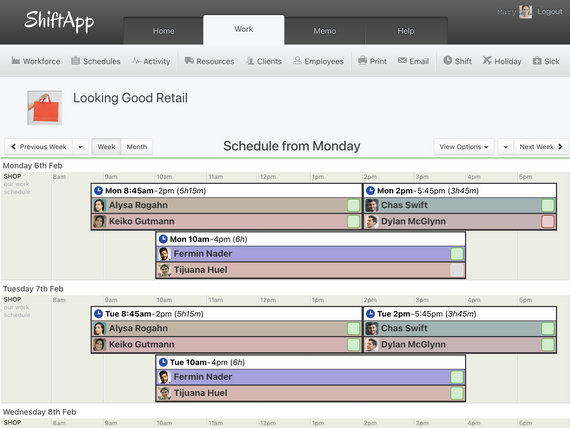
One store or several
Give each store its own schedule, or a workforce of its own with its own managers. Staff who work in more than one store can be put on shifts in each of them.
Common questions
Can part-time staff tell me when they can work?
Yes. Staff mark when they can and can't work, and you see it next to each name as you assign shifts.
Can I add extra staff for Christmas?
Yes. Add seasonal staff as employees for the busy weeks, then deactivate them afterwards. They stop counting towards your plan, and their shifts stay on the schedule for your records.
Can staff see each other's shifts?
Only if you allow it. Choose whether staff see the whole schedule or only their own shifts.
Can I export hours for payroll?
Yes. Export each employee's hours to CSV for any dates and open the file in a spreadsheet.
ShiftApp has been so useful to use. We could never find the right way to do the schedules until we discovered your system.

Leon Milner
Store Manager
Sony Center
Try ShiftApp in your shop
Start a 21-day free trial with no credit card and build next week's schedule with your own staff.
Start free trial 21 days free. No card needed.