
21 days free. No card needed.
Time Off Requests and Allowance Tracking
When time off requests come in by text, email or a word in the corridor, one gets missed, and someone ends up on a shift while they're away. In ShiftApp, staff send requests from their phone, you approve them, and approved time off sits on the same schedule you use to plan shifts.
From request to schedule
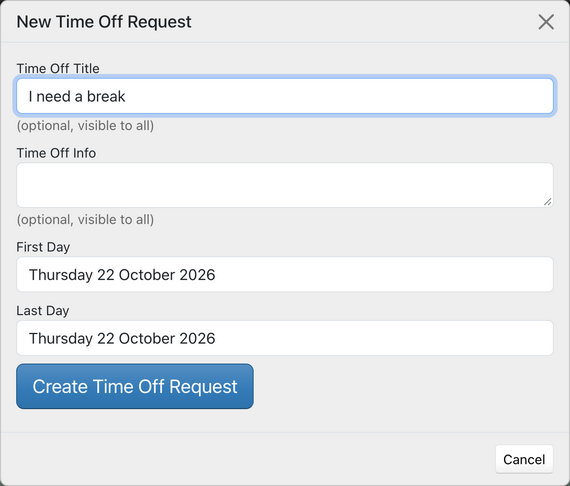
An employee picks their dates in the app or on the website and sends a request. Managers can get an email about it, and a notification in the app.
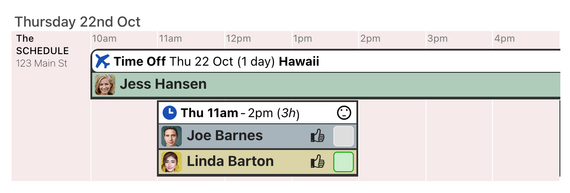
You approve the request on the schedule. The employee gets an email when it is approved, declined or changed, and the time off appears on the schedule. While they're away they show as unavailable when you assign shifts, so you don't book them by mistake.
Managers can also add time off for anyone, for example when someone asks in person.
Allowances in days or hours
Set a default yearly allowance for the workforce and change it for anyone on their employee record. Count time off in days, or in hours for staff whose days are different lengths. Choose the date your time off year starts, such as January or April.
The time off report shows each person's allowance, the days or hours confirmed and requested, and how much is left. Print it as a PDF, or export time off to CSV.
Your rules
- Let staff send their own requests, or turn requests off so only managers add time off.
- Show approved time off to all staff, or only to managers and the person away. Staff see only their own requests until they are approved.
- Hide time off from the schedule and printouts, or keep it on a schedule of its own.
ShiftApp has been well received by the team after the usual skepticism! They enjoy being able to see when others are away without having to ask their manager. We also use the system to allocate our clinical rooms, which works very well.

Daniel Vincent
Practice Manager
Ryalls Park Medical Centre
Common questions
Can I stop staff booking time off themselves?
Yes. Turn off employee time off requests in your workforce settings, and only managers can add time off.
Will I see that someone is away before I put them on a shift?
Yes. They show as unavailable on the assignment menu for those days.
Can part-time staff have an allowance in hours?
Yes. Choose hours on their employee record and set their allowance in hours.
Our time off year starts in April. Is that a problem?
No. Set the month and day your time off year starts, and allowances and reports follow it.
21 days free. No card needed.