
4 On 4 Off Schedule: How It Works and How to Set It Up
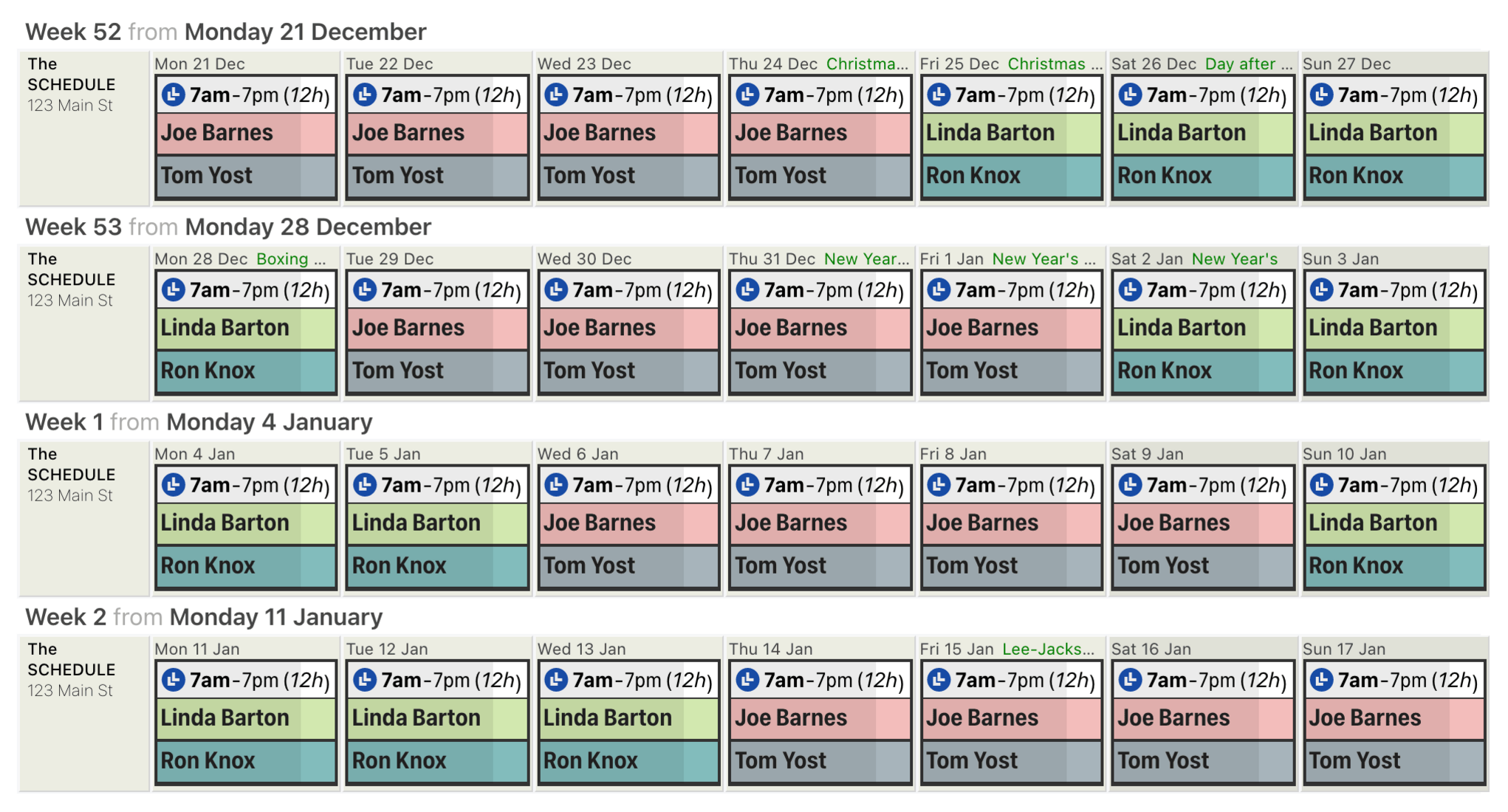
A 4 on 4 off schedule has each person work four days in a row, then take four days off. The cycle is 8 days long, so the working days move through the week instead of falling on the same weekdays every week.
It suits work that runs every day, often with 12-hour shifts: care homes, security, healthcare, manufacturing and call centers. This page covers the cycle, the hours and weekends it gives, how many teams you need, and how to set it up in ShiftApp.
How the 8-day cycle works
Days 1 to 4 are working days and days 5 to 8 are off. Day 9 is day 1 again. Starting on a Monday, one person's first blocks look like this:
- work Monday to Thursday, off Friday to Monday
- work Tuesday to Friday, off Saturday to Tuesday
- work Wednesday to Saturday, off Sunday to Wednesday
- work Thursday to Sunday, off Monday to Thursday
Each block starts a day later in the week than the one before. After 8 weeks (56 days) the blocks fall on the same weekdays as at the start.
Hours per week
Each person works 4 shifts in every 8 days. Averaged over the cycle, that is:
- 42 hours a week with 12-hour shifts
- 35 hours a week with 10-hour shifts
- 28 hours a week with 8-hour shifts
A calendar week holds either 3 or 4 working days, so with 12-hour shifts a person's week is 36 or 48 hours. Unpaid breaks come off these figures. Check the totals against your contracts and the working time rules where you are.
Weekends
Over the 8 weeks it takes the pattern to come round again, each person works 8 of the 16 weekend days: 3 whole weekends on, 3 whole weekends off and 2 split weekends. Everyone on the pattern gets the same share, so nobody is stuck with every Saturday.
How many teams you need
A team can be one person or several.
- One shift a day, every day: two teams. Team A works days 1 to 4 and team B days 5 to 8, so every day has one team on.
- Day and night shifts, round the clock (12-hour shifts): four teams. Teams A and B cover the day shift as above, and teams C and D cover the night shift in the same way.
- Rotating days and nights: to share the nights out, some schedules run 4 days on, 4 off, 4 nights on, 4 off. That cycle is 16 days long, and four teams starting 4 days apart cover every day and every night. Hours per week are the same as above.
Setting up a 4 on 4 off schedule in ShiftApp
ShiftApp builds the pattern from repeating shifts. You set up the first 8 days once, and the repeats carry on from there.
- Add the shifts for the first 8 days of the cycle and assign the right people. For one team, that is a shift on each of days 1 to 4. For two teams, add team B's shifts on days 5 to 8.
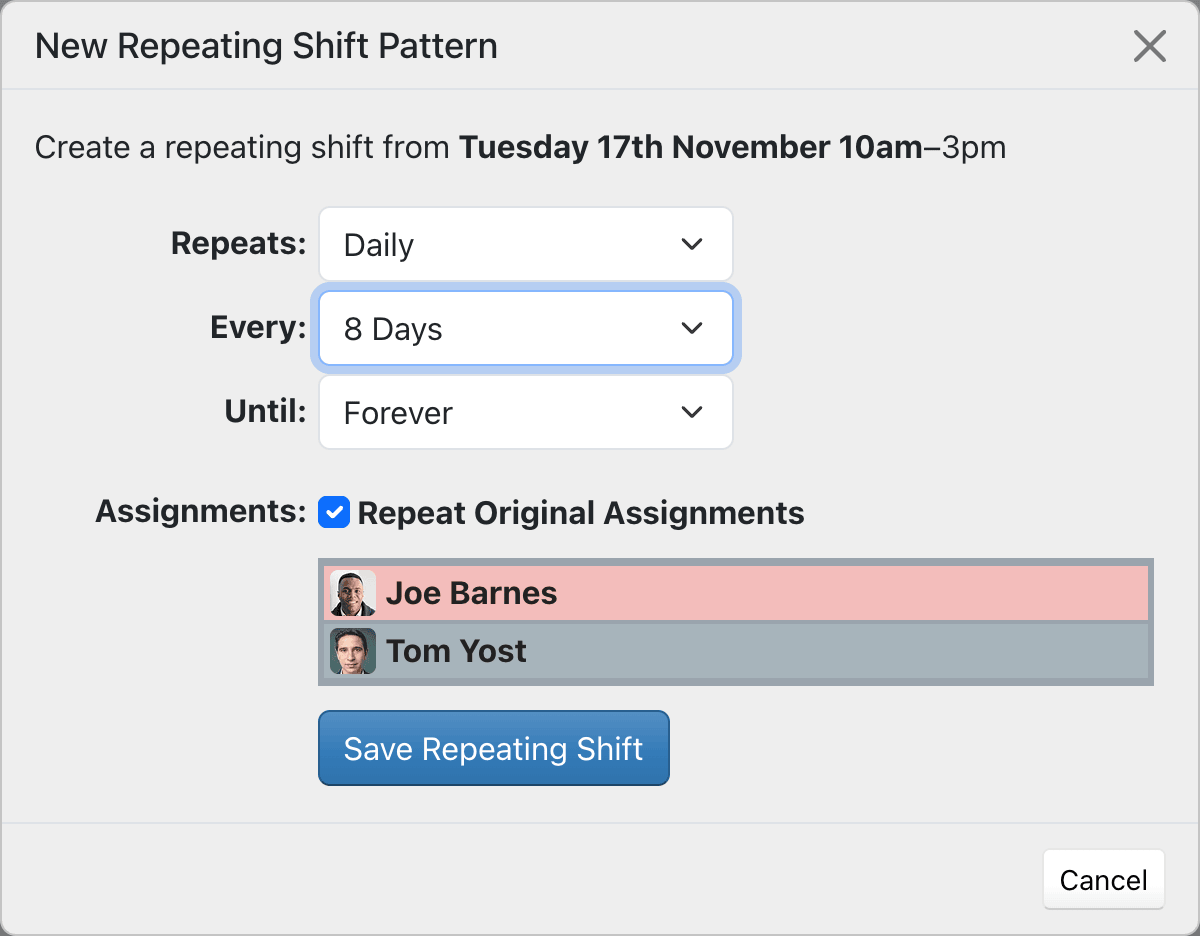
- Open the first shift and choose Repeat.
- Set Repeats to Daily and Every to 8 Days. Leave Until at Forever, or pick an end date.
- Keep Repeat Original Assignments ticked so the same people stay on every repeat, then choose Save Repeating Shift.
- Do the same for each of the other shifts in the first 8 days.
The shifts then fill the schedule as far ahead as your plan allows (see repeating shifts). For the 16-day days-and-nights pattern, add 16 days of shifts and repeat each one every 16 days.
The same method works for any cycle up to 120 days. 2 on 2 off repeats every 4 days, 3 on 3 off every 6 days, and 5 on 5 off every 10 days.
Pros and cons
What staff tend to like:
- four full days off in every eight
- weekends shared out evenly
- working with the same team each block
What to watch:
- 12-hour shifts are long, and four in a row is tiring, especially on nights
- working days move through the week, which makes childcare and second jobs harder to plan
- the two teams rarely work together, so handovers need a set routine
Because the days move, it is easy to forget which day you're back. In ShiftApp, staff see their shifts in the app, get a reminder before each shift, and can add their shifts to their phone's calendar with a calendar feed.
Common questions
How many hours a week is 4 on 4 off?
How many teams does 4 on 4 off need for round-the-clock cover?
Can someone cover one shift without changing the pattern?
What happens when someone books time off?
Can I build the pattern before staff see it?
New to ShiftApp? You can set up a 4 on 4 off schedule on the free 21-day trial. No card is needed.
See Also
Navigate
Documentation
- 4 On 4 Off Schedule: How It Works and How to Set It Up
- How to change the Workforce Owner?
- How to upload the Workforce Logo
- How to Limit How Far Ahead Employees See Their Shifts
- How Employees Can See Each Other's Shifts
- How can I quickly view unfilled shifts?
- Software Feature Requests
- How to plan a schedule in private?
- How to share the whole schedule with all employees?
- Delete your ShiftApp User Account
- How to Change the Display Order of Multiple Schedules
- Workforces
- Create a new Workforce
- Workforce Settings
- Create a New Schedule
- Add New Employee Record
- Manage Employee Records
- Adding a New Shift
- Shift Breaks
- Assigning Employees to Shifts
- Double Assignments - Block, Warn, Allow
- Availability for Managers
- Shift Interest and Shift Agreement Display
- How to use Repeating Shifts
- Shift Cloning
- Calendar Navigation and Controls
- Data Retention, Backups, Archives, and Google Drive